Defining The Engine
Guidelines
In order to progress through the rest of the blog posts (including non-R36S-related ones), we need to start building a framework that remains consistent across our experiments. Like any game engine, it should serve as a reusable foundation that we can build on top of repeatedly.
Let’s start defining an API we will agree on for the rest of these blog posts. First, we need to lay out some guidelines:
- Abstract low-level platform dependencies: We already used SDL2 when working on the R36S, and this is a great starting point. However, we’ll want to wrap it in an abstraction layer so we don’t need to care about the underlying implementation. We will call this abstraction layer
device, and it will serve as the foundation for any higher-level systems we build. - Aim to be lightweight: It should not try to do everything just for the sake of it. If we notice that a piece of code is being written multiple times, or that a feature is consistently needed, then it likely belongs in the engine. Usually, we will first prototype it in the game code, and once it matures we can move it into the engine.
- Minimal STD use: The standard library provides many useful features; however, engine development often benefits from tighter control over containers, memory allocation, and performance behavior than what generic STL implementations provide. Writing our own data structures helps us understand the engine’s needs and will lay the foundation for our custom memory management system. This does not apply to the game code — when writing a game, we benefit more from simply getting things done. If we later decide something belongs in the engine, we can audit and migrate it accordingly (and it won’t always be wrong to use the STL).
- Minimal dependencies: Similar to avoiding the STL, we want control over our codebase. It’s easy to add third-party libraries just because a feature seems convenient. Don’t get me wrong—there are many great libraries out there—but the goal is to avoid bloating our engine with unnecessary dependencies. Instead, we’ll carefully consider whether adding a library truly benefits us or whether we’re over-engineering. A good rule of thumb is that each time we add a dependency, we lose some ownership of that part of the engine and may introduce unintended bottlenecks.
- Documented, compatible, versioned, and tested: All engine-facing functions should be properly documented in a clear and intuitive way, without requiring readers to constantly refer to implementation details. As the engine evolves, we want to remain as backwards compatible as possible. Changing function signatures or behaviour is a red flag, though sometimes unavoidable. This leads to another important goal: versioning the engine properly. In cases where we can’t maintain backwards compatibility, the engine should still provide a way to conditionally compile code depending on which version is being used. Lastly, the engine should be testable via unit tests. Code added to the engine must pass existing tests, and new features should come with their own tests.
Keep in mind that while these are guidelines, there will be situations where they don’t strictly apply. One example is that, in this blog, we will be using OpenGL directly via GLAD. Since the engine is already linking against GLAD, instead of hiding it behind an abstraction layer within the engine, having direct access to OpenGL functions makes it easier to build the game code and discuss the OpenGL features supported by the R36S.
Once we build an abstraction around OpenGL, it should be clear what is happening under the hood, while also allowing us to support other graphics APIs.
The Engine
Let’s start by defining what the device abstraction will do for us, which is mostly wrapping what we already had using SDL:
#pragma once

#include <cstdint>

/// Platform

/// <summary>
/// Initialize underlying platform systems (graphics, input, timing, etc).
/// Must be called before any other device_* function.
/// </summary>
/// <returns>True if initialization succeeded.</returns>
bool device_init();

/// <summary>
/// Shut down platform subsystems and release allocated resources.
/// </summary>
void device_shutdown();

/// <summary>
/// Poll input and prepare a new frame.
/// Should be called once per frame in the main loop.
/// </summary>
/// <returns>False if the application should terminate.</returns>
bool device_begin_frame();

/// <summary>
/// Present the rendered frame and perform synchronization.
/// </summary>
void device_end_frame();

/// <summary>
/// Request the device to close.
/// </summary>
void device_close();

/// <summary>
/// Get the current screen size in pixels.
/// </summary>
/// <param name="width">Output screen width.</param>
/// <param name="height">Output screen height.</param>
void device_screen_size(int* width, int* height);

/// Timing

/// <summary>
/// Get a high-resolution timestamp.
/// Should only be used together with device_to_seconds().
/// </summary>
/// <returns>Platform-dependent timestamp value.</returns>
uint64_t device_timestamp();

/// <summary>
/// Convert a timestamp returned by device_timestamp() into seconds.
/// </summary>
/// <param name="ts">Timestamp value.</param>
/// <returns>Time in seconds.</returns>
double device_to_seconds(uint64_t ts);

/// Input

#define DEVICE_BTN_SOUTH	0x00
#define DEVICE_BTN_EAST		0x01
#define DEVICE_BTN_WEST		0x02
#define DEVICE_BTN_NORTH	0x03
#define DEVICE_BTN_L1		0x04
#define DEVICE_BTN_L2		0x05
#define DEVICE_BTN_L3		0x06
#define DEVICE_BTN_R1		0x07
#define DEVICE_BTN_R2		0x08
#define DEVICE_BTN_R3		0x09
#define DEVICE_BTN_SELECT	0x0A
#define DEVICE_BTN_START	0x0B
#define DEVICE_BTN_MODE		0x0C
#define DEVICE_BTN_UP		0x0D
#define DEVICE_BTN_DOWN		0x0E
#define DEVICE_BTN_LEFT		0x0F
#define DEVICE_BTN_RIGHT	0x10
#define DEVICE_BTN_COUNT	0x11

#define DEVICE_AXIS_LX		0x00
#define DEVICE_AXIS_LY		0x01
#define DEVICE_AXIS_L2		0x02
#define DEVICE_AXIS_RX		0x03
#define DEVICE_AXIS_RY		0x04
#define DEVICE_AXIS_R2		0x05
#define DEVICE_AXIS_COUNT	0x06

/// <summary>
/// Get whether a button is currently held down.
/// </summary>
/// <param name="btn">One of DEVICE_BTN_* constants.</param>
bool device_button(uint8_t btn);

/// <summary>
/// Returns true only on the frame the button was pressed.
/// </summary>
/// <param name="btn">One of DEVICE_BTN_* constants.</param>
bool device_pressed(uint8_t btn);

/// <summary>
/// Returns true only on the frame the button was released.
/// </summary>
/// <param name="btn">One of DEVICE_BTN_* constants.</param>
bool device_released(uint8_t btn);

/// <summary>
/// Get the current value of an analog axis.
/// </summary>
/// <param name="axis">One of DEVICE_AXIS_* constants.</param>
/// <returns>Normalized axis value (-1.0 to 1.0 typically).</returns>
double device_axis(uint8_t axis);
As our first version of the engine, we will also have an engine module, that for now, just defines the version and basic application entry-point workflow we will build on:
#pragma once

/// Minor version, small changes and usually backwards compatible.
#define ENGINE_VERSION_MINOR 1

/// Major version, larger changes that may introduce breaking changes.
#define ENGINE_VERSION_MAJOR 0

/// <summary>
/// Application callback container.
/// Defines the lifecycle callbacks for a user application.
/// </summary>
struct app_t
{
	using config_fn = void(*)(int argc, char** args);
	using init_fn = bool(*)();
	using shutdown_fn = void(*)();
	using update_fn = void(*)(double dt);
	using render_fn = void(*)();

	config_fn config = nullptr;
	init_fn init = nullptr;
	shutdown_fn shutdown = nullptr;
	update_fn update = nullptr;
	render_fn render = nullptr;
};

/// <summary>
/// Run the engine with the given application.
/// Initializes the engine and starts the main loop.
/// </summary>
/// <param name="app">Application callbacks.</param>
/// <returns>Exit code.</returns>
int engine_run(int argc, char** args, const app_t& app);
For the initial version of the engine, we have the following dependencies:
- SDL2: Low-level platform stuff. It’s battle-tested, works well on all platforms including dArkOS, and comes with some extra features that will definitely be useful later, so it’s a solid base to build on.
- GLAD: OpenGL function loader. It basically gives us access to modern OpenGL by loading all the function pointers at runtime. Very standard choice, very low overhead, and it just gets out of the way so we can focus on rendering, and will cover all the features we’ll need as we progress through the series.
- GLM: Go-to math library for graphics work. It’s header-only, follows GLSL-style syntax, and is widely used across hobby and indie engines. It’s very well documented and easy to work with. Since the point of this series is to focus on the R36S and engine work itself, avoiding writing custom math from scratch saves a lot of time.
Note that for now these dependencies are intertwined with the game, for now both the game and the engine live in the same workspace, however, once the engine start to be used in other blogs and scales, it will be migrated to a repository we can maintain separately. For now, we’ll split the sources in two folders engine and game, each correspond to two separate libraries, that way the engine stays isolated and reusable. The game source is always specific to a blog, and whenever the engine version used for that blog is ambiguous, I will state which version is being used by the blog.
Game Example
Now that we’ve defined the structure of the engine, let’s use it to build an example with some graphics and some basic animations:
#include <game/game.hpp>
#include <engine/device.hpp>

#include <glad/glad.h>
#include <glm/glm.hpp>
#include <glm/gtc/matrix_transform.hpp>
#include <glm/gtc/type_ptr.hpp>

#include <cstdio>

static double time = 0.0;

static double timer = 0.0;
static int frames = 0;

static GLuint program = 0;
static GLuint vao = 0;
static GLuint vbo = 0;
static GLuint ebo = 0;

static const char* vs_src =
R"(#version 310 es
layout(location = 0) in vec3 aPos;
layout(location = 1) in vec3 aColor;

uniform mat4 uMVP;
out vec3 vColor;

void main() {
    vColor = aColor;
    gl_Position = uMVP * vec4(aPos, 1.0);
}
)";

static const char* fs_src =
R"(#version 310 es
precision mediump float;

in vec3 vColor;
out vec4 fragColor;

void main() {
    fragColor = vec4(vColor, 1.0);
}
)";

static const float vertices[] =
{
    -0.5f,-0.5f,-0.5f,    1,0,0,
     0.5f,-0.5f,-0.5f,    0,1,0,
     0.5f, 0.5f,-0.5f,    0,0,1,
    -0.5f, 0.5f,-0.5f,    1,1,0,

    -0.5f,-0.5f, 0.5f,    1,0,1,
     0.5f,-0.5f, 0.5f,    0,1,1,
     0.5f, 0.5f, 0.5f,    1,1,1,
    -0.5f, 0.5f, 0.5f,    0.2f,0.8f,0.3f
};

static const unsigned int indices[] =
{
    0,1,2, 2,3,0,
    4,5,6, 6,7,4,
    4,0,3, 3,7,4,
    1,5,6, 6,2,1,
    4,5,1, 1,0,4,
    3,2,6, 6,7,3
};

static void config(int argc, char** args) {}

static bool init()
{
    GLuint vs = glCreateShader(GL_VERTEX_SHADER);
    glShaderSource(vs, 1, &vs_src, nullptr);
    glCompileShader(vs);

    GLuint fs = glCreateShader(GL_FRAGMENT_SHADER);
    glShaderSource(fs, 1, &fs_src, nullptr);
    glCompileShader(fs);

    program = glCreateProgram();
    glAttachShader(program, vs);
    glAttachShader(program, fs);
    glLinkProgram(program);

    glDeleteShader(vs);
    glDeleteShader(fs);

    glEnable(GL_DEPTH_TEST);

    glGenVertexArrays(1, &vao);
    glBindVertexArray(vao);

    glGenBuffers(1, &vbo);
    glBindBuffer(GL_ARRAY_BUFFER, vbo);
    glBufferData(GL_ARRAY_BUFFER, sizeof(vertices), vertices, GL_STATIC_DRAW);

    glGenBuffers(1, &ebo);
    glBindBuffer(GL_ELEMENT_ARRAY_BUFFER, ebo);
    glBufferData(GL_ELEMENT_ARRAY_BUFFER, sizeof(indices), indices, GL_STATIC_DRAW);

    glVertexAttribPointer(0, 3, GL_FLOAT, GL_FALSE, 6 * sizeof(float), (void*)0);
    glEnableVertexAttribArray(0);
    glVertexAttribPointer(1, 3, GL_FLOAT, GL_FALSE, 6 * sizeof(float), (void*)(3 * sizeof(float)));
    glEnableVertexAttribArray(1);

    return true;
}

static void shutdown()
{
    glDeleteBuffers(1, &vbo);
    glDeleteBuffers(1, &ebo);
    glDeleteVertexArrays(1, &vao);
    glDeleteProgram(program);
}

static void update(double dt)
{
    time += dt;

    timer += dt;
    frames++;

    if (timer >= 1.0)
    {
        printf("FPS: %d\n", (int)(frames / timer));
        frames = 0;
        timer = 0;
    }
}

static void render()
{
    int w, h;
    device_screen_size(&w, &h);

    glViewport(0, 0, w, h);
    glClearColor(0.1f, 0.2f, 0.4f, 1.0f);
    glClear(GL_COLOR_BUFFER_BIT | GL_DEPTH_BUFFER_BIT);

    glUseProgram(program);
    glBindVertexArray(vao);

    glm::mat4 model = glm::rotate(glm::mat4(1.0f), (float)time, glm::vec3(0.5f, 1.0f, 0.0f));
    glm::mat4 view = glm::translate(glm::mat4(1.0f), glm::vec3(0, 0, -2.5f));
    glm::mat4 proj = glm::perspective(glm::radians(60.0f), (float)w / (float)h, 0.1f, 100.0f);
    glm::mat4 mvp = proj * view * model;

    GLint loc = glGetUniformLocation(program, "uMVP");
    glUniformMatrix4fv(loc, 1, GL_FALSE, glm::value_ptr(mvp));

    glDrawElements(GL_TRIANGLES, sizeof(indices) / sizeof(unsigned int), GL_UNSIGNED_INT, 0);
}

app_t game_create_app()
{
    app_t app;
    app.config = &config;
    app.init = &init;
    app.shutdown = &shutdown;
    app.update = &update;
    app.render = &render;
    return app;
}
#include <engine/engine.hpp>
#include <game/game.hpp>

int main(int argc, char** args)
{
    app_t app = game_create_app();
    return engine_run(argc, args, app);
}
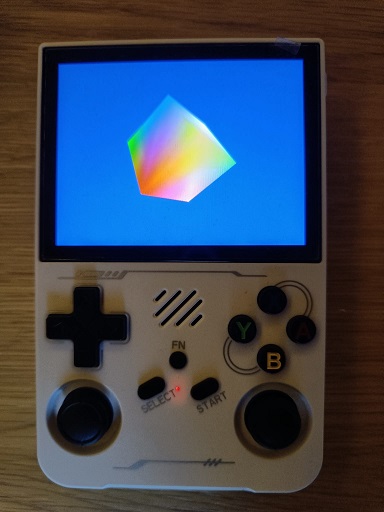
We’re setting up a small, reusable engine framework with a lightweight device abstraction over SDL2 and a minimal engine loop to keep things consistent as we build forward.
Next time, we’ll start adding proper graphics to the game and aim to get a “nice looking scene” up and running. First using a naive implementation, and once that’s in place, the real focus of the series begins: profile the scene on the R36S, go through those naive solutions, understand what the machine is actually doing, and improve the code to achieve the best performance we can get on the device.
See you in the next blog!